
Leverage Real-Time Business Intelligence
to Optimize Mobile Assets
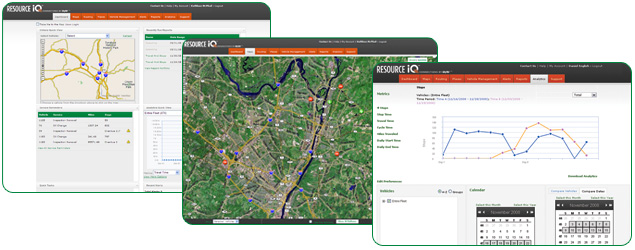
Click Screenshots to Enlarge
Commercial businesses and government organizations are facing unprecedented economic challenges. In short, most entities are being asked to do more with less. Managing remote and mobile assets offers a substantial opportunity to identify the most efficient ways to align resources to meet the demands of customers and competition.
Resource iQ™ is a powerful optimization technology that enables organizations to implement best practices based on real-time metrics, driven by vehicle-based GPS tracking.
- Operational visibility for the last mile of Supply Chain
- Access to historical customer data so you can anticipate their requirements proactively
- Optimization of routes, eliminating driver overtime and increasing workforce utilization
- Access to asset histories for immediate data regarding repair decisions and continued maintenance investment
- Aggressive SLAs with precise times to be met, surpassing customer commitments for on-time, as-promised service delivery
- Reductions in fuel costs by refining routes and deploying closer assets
Bottom line? Exceed your customers. expectations while reducing your expenses.
Click here to listen to Daniel English, SkyTel Product Development, talk about Resource iQ >>
Click here for just-released Frost & Sullivan MRM analyst report on Mobile Resource Management must-haves>>
DEEP ANALYTICS AND DEDICATED iQ EXPERT
WILL
HELP
DRIVE BEST-IN-CLASS
PERFORMANCE
Nearly every fleet tracking and management product on the market today offers mapping and reporting at some level. But no other Mobile Resource Management tool delivers a dedicated iQ Expert to help you create the right reports, interpret the data in a meaningful way for your business and help you build an action plan based on your strategic goals and financial objectives.
- Product Training so you know how to optimize your fleet performance and economics
- Opportunity Analysis to identify overall performance trends, ROI and additional target goals
- ROI Support to establish strategic performance goals and a map to achieving quick and substantial ROI
- Best-Practice sharing and performance benchmarking on
operational, financial and
strategic imperatives to hardwire improvements.
Q: WHO IS USING RESOURCE iQ?
A: Anyone who needs to know where their assets are and when
they will arrive at their destination.safely and most cost effectively.
- Field Service & Delivery
Plumbing & HVAC, Electrical Contractors, Transportation Infrastructure
(trucking, distributors) - Passenger Transport
Ambulances, Shuttles, Taxis, Auto Leasing - Construction
Commercial, Residential and Heavy Construction - Telecom and Utilities
Cable, Electrical, Water & Waste Management - Business Owners
You own the workforce.and the results - Dispatchers and Fleet Managers
Making key decisions in real-time and managing fleet expenses - IT Managers and Finance Executives
You decide which solution fits your infrastructure
REAL TIME PERFORMANCE MONITORING, KEY PERFORMANCE
INDICATORS (KPI), EXCEPTION REPORTS AND ALERTS
Actionable intelligence about people and assets is key to ensuring your resources are optimally aligned with current or projected demands. And when every dollar counts, using optimization technologies allows for increased service capacity without growing labor and vehicle provisioning. Not only do we help you manage your business, we help you grow it.
REAL TIME ALERTS
- Speeding: Know if vehicle exceeds set limit to reduce fuel and insurance costs
- Long Stop: Eliminate extended breaks or have visibility to anticipate job disruptions
- GeoFence: Know when vehicle enters/exits a virtual .fenced.
area you set up, be it a
job site or delivery area - Late Start: Get notice if vehicle starts day behind schedule
and customer satisfaction
is at risk - Excess Idle: If ignition is on but vehicle isn.t moving, wasted fuel dollars cost you money
- Activity: Find out if off-hours or unauthorized use could
place your fleet assets at risk
- Towing: Timing is critical if vehicle is towed . find out
if ignition is off but movement
is detected
DISPATCH AND TRACKING
Giving your dispatch team the best information at their fingertips will provide the tools they need to deploy resources appropriately and cost effectively. With satellite images and quarterly updates to maps, you can direct drivers to exact locations. Reroute fleets based on real-time location tracking so you can get to the customer even faster.
ALL WITH SKYTEL.S INDUSTRY-LEADING COMMITMENT TO SERVICE
Step 1 . Hassle-free installation with a nationwide network of certified installers. We will come to your location, at your convenience, with no surprise charges for installation or coordination services.
Step 2 . Training for you and your team, from account set up through custom training based on how you will use Resource iQ.
Step 3 . Ongoing support is always available from Resource iQ Care: Phone, email, web support, flexible billing and cost-management tools, Online account management.
**Call 888-443-6189 or email us at ResourceiQ@skytel.com
to talk to an iQ Expert.**